How to Use DualSMS: Beginner’s Guide to First SMS Code
Step-by-step instructions for signing up on DualSMS, choosing a virtual number, and receiving your first verification code. Automatic refunds apply if no SMS arrives.
· 2 min read
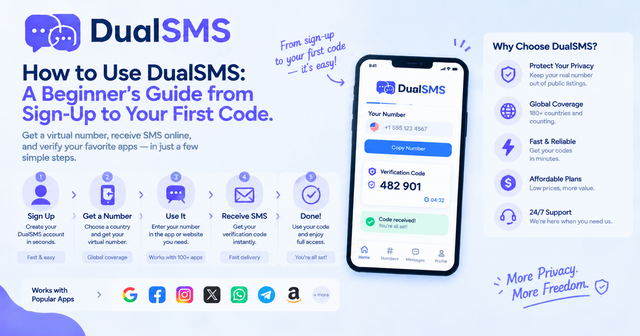
DualSMS lets you receive SMS verification codes online without using your personal SIM. This guide walks through the entire process from creating an account to getting your first code.
Creating Your DualSMS Account
Start by visiting the DualSMS homepage and clicking the sign-up button. Enter a valid email address and set a password. Confirm your email via the link sent to your inbox. No phone number is required to register.
Once logged in, you will see your account balance and options to add funds. Payment methods include major cards and popular wallets. Funds are added instantly and can be used immediately for numbers.
Choosing a Service and Country
Browse the available services on the dashboard. Popular options include WhatsApp, Telegram, Google, Gmail, Youtube, Instagram + Threads, and Facebook. Select the service you need, then pick a country from the list.
Each listing shows the current price and available numbers. Prices vary by service and country. After selecting a number, it is reserved for you for the listed time window.
Receiving Your Verification Code
- Copy the virtual number shown on the page.
- Enter that number into the app or website you are verifying.
- Return to DualSMS and watch the incoming SMS appear in seconds.
- Copy the code and paste it where required.
If no SMS arrives within the expected time, an automatic refund is issued to your balance. You can then try another number.
Examples for Common Services
- For messaging apps, start with WhatsApp or Telegram.
- Social platforms often work well with numbers from Instagram + Threads or Twitter / X.
- Email and productivity services are covered under Google, Gmail, Youtube and Microsoft + Outlook.
Keep reading
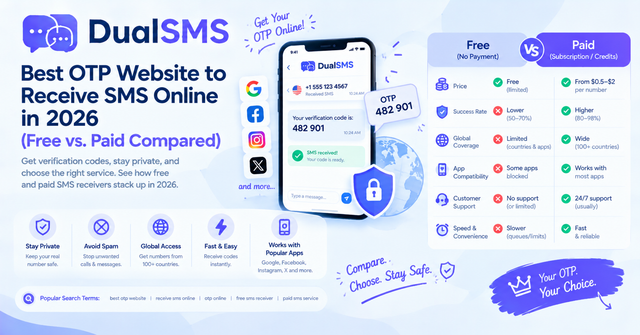
OTP Website Guide: Free vs. Paid Ways to Receive SMS Online (2026)
An OTP website gives you a temporary number to receive one-time SMS codes without your own SIM. Here is how free public sites compare with paid private numbers, and why free ones often fail.
· 4 min read
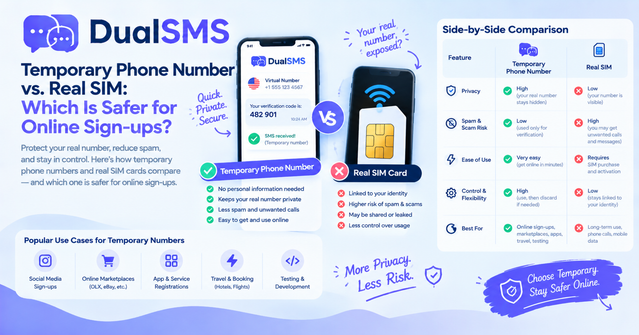
Temporary Phone Number vs. Real SIM: Which Is Safer for Sign-Ups?
A temporary phone number is the better choice for one-time sign-ups where you want to keep your personal number private. A real SIM is the better choice for banking and your main accounts.
